I have earned my first 5 cent!

Posted: 11th October 2007 by Jacky Yong in Computers, Silly me

What’s that you’re saying? 5 cent is not a big deal? Well, it is for me, when all I ever did was to do the two things that I like to do; blogging and taking pictures! =P

How did I do it? Why, Google Adsense of course!

earning.jpg

As easy as signing up at http://www.google.com/adsense
You can support this site by clicking on the ad sites in the links below! Hey, it doesn’t cost you anything now, does it?

Angkasawan going to (Google) space!

Posted: 10th October 2007 by Jacky Yong in Current Affairs

I am surprised when I saw the news in Google News today.

malaysianinspace.JPG

The angkasawan is not only going to space, it is also a big news in the Science / Tech section of Google news! I can’t say that I’m agreeing or against the idea of sending a Malaysian into space. But Malaysian government has been known to do really silly stunts in the name of “global recognation”. (Remember the pyramid stunt?) Not to mention the amount of white elephants built, just for the sake of building them.

I still prefer that the money used to send him to space can be used for far better purposes, like improving the public transport and the education sector. Excuse me if you have already heard my lament before, but call me long-winded. I have always stood by my own opinion.

So is Dr Sheikh really garnered my votes during his inaugural space launch in about 1/2 hour from now? If by sending him to space can fix my car’s power window and Malaysia’s roads, then I’m all for it. Else I’m still left with the question in everyone’s mind: “What’s in it for me?”

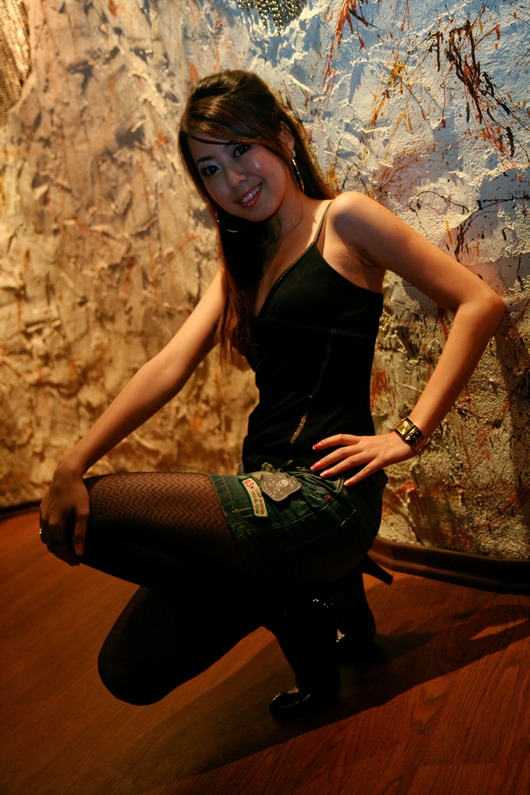
More often than not, I encounter pictures taken in very difficult lighting conditions that forced me to compromise. I recently took pictures of a bunch of models in a dark pub. Not an easy task I tell you. Flash was used extensively. And because my flash was not properly colour corrected, the colours of their faces came out really bad. ‘Nuf said, let’s see some pictures to prove this point:
_mg_8955.jpg

Bad isn’t it? The ambient lighting was warm, but the flash from my light is blueish white! And her face was badly under exposed! Urgh!!

I can always put it through the usual cycle of fixing exposure and white balance under Lightroom, but then the whole picture will be affected, and I don’t want that, because as you can see, the other places are ok. So I opted for Photoshop. Here I will document what are the steps that I took to overcome this problem. Please note that this is by no means the best method. I am just a newbie trying to solve my own problems. If someone has a better and simpler idea, do please share them with me.

Open the picture in Photoshop:
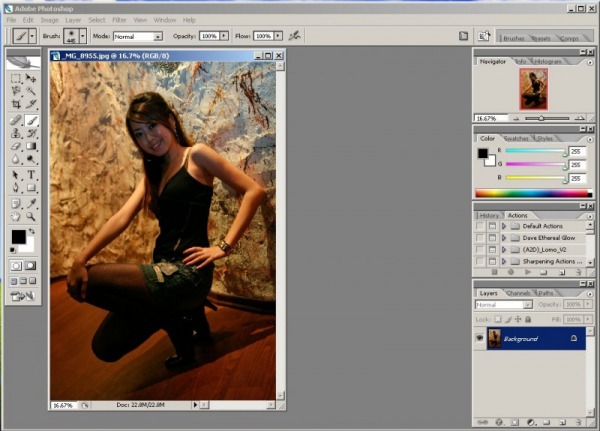
screen_1.jpg

The picture looks dark doesn’t it? I am going to adjust the exposure first, because from experience, adjusting the exposure will normally skew the white balance a bit.

Go to layer – New Adjustment Layer – Levels…
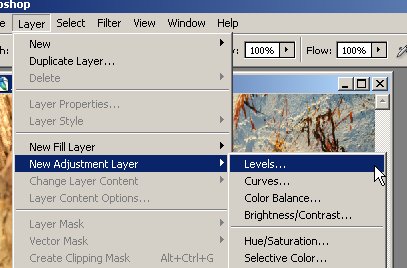
screen_2.jpg

Adjust the middle arrow to the left. I think this corresponds to middle exposure. Don’t care lar… as long as it makes the face brighter. Experiment a bit with the other arrows and directions if you want.
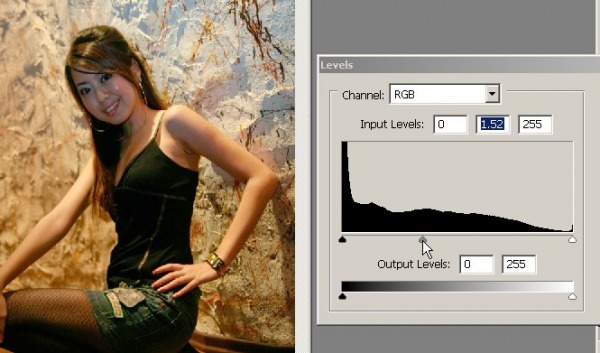
screen_3.jpg

Tap on the “\” key. See the sign on the left of the tool box. The black square should change place with the white square. This is the whole point of this write-up, to show you what the whole deal is with the layer mask.

screen_4.jpg

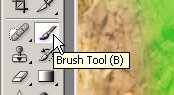
Select the brush tool.
screen_5.jpg

Here comes the interesting part. With your brush, paint over the areas outside of the area that you want to work on, in this case, the model’s face. Note that you might not get the same green colour that I have. The layer of “paint” that you apply here is called the mask.
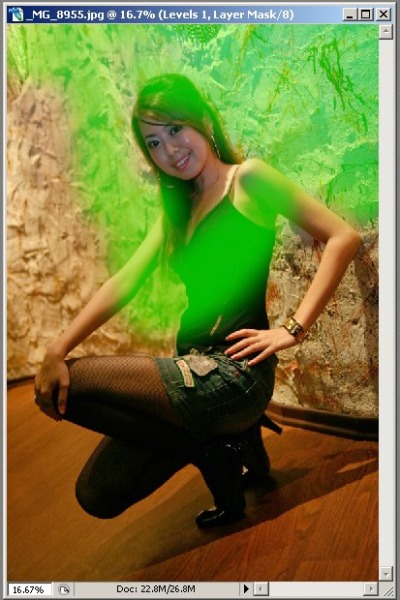
screen_6.jpg

If you have mistakenly painted over areas that you do not want to paint, you can do a few things:

  • Cry like a baby and press Ctrl-Z, in which case you might also undo off portions that you wanted to keep. Very uncool method, IMHO.
  • Be cool and press “\” one more time, and paint over the erroneous parts. You should see now that the white square has switched places with the black square again. But then you wouldn’t be able to see where you are painting over, because you have just turned off the mask preview by pressing the “\” key.
  • A better option would be to use the eraser tool without pressing the “\” key. You get the see the mask layer, so you can see where you are deleting from.

You might want to customize the colour of the mask to suit your picture. It’s a good idea to use a high contrasting colour to the overall picture that you are working on. To do that, double click on the layer mask thumbnail as below:
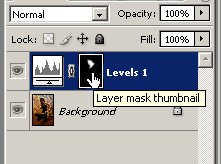
screen_7.jpg

Select an appropriate colour for the mask.
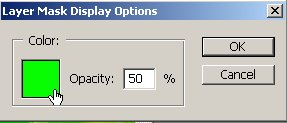
screen_8.jpg

As you work on the mask, you might be able to see the thumbnail of the mask reflecting the colour of your paint. This is a good indication of which spots that you may have missed.

To confirm after you have finished doing all this, click on the “eye” icon next to the layer. You can now view the effect before and after your little tweak. Neat huh?
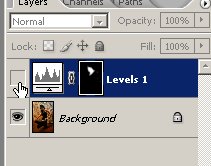
screen_9.jpg

Here is the picture after this initial step. As you can see, her face has brightened up considerably.
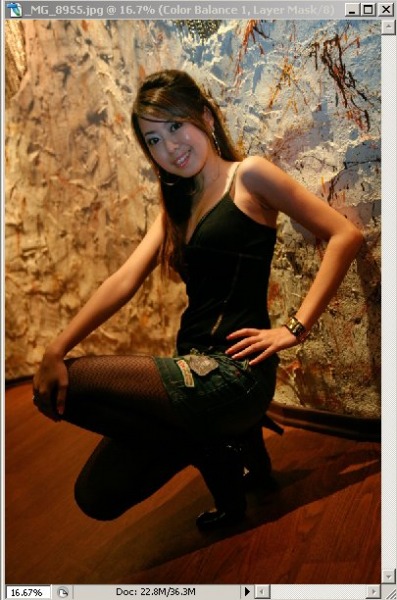
screen_10.jpg

Although the brightness of her face has now been fixed, the white balance is still off.

Now comes the next part, fixing the white balance. Go to Layer – New Adjustment Layer – Color Balance…
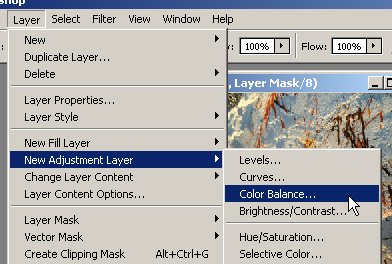
screen_11.jpg

A dialogue box will be shown. Just accept everything at the moment.
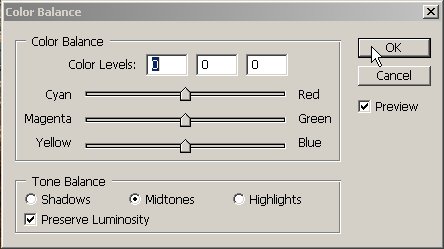
screen_12.jpg

Again repeat the same step to paint over this new layer with the green mask. Here is how it looks like after completion:
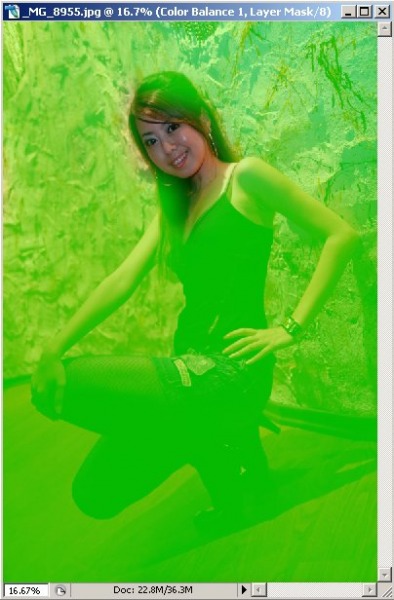
screen_13.jpg

Now that you have determined the mask, double click on the layer, this time on the Layer Thumbnail (see illustration below)
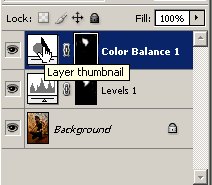
screen_14.jpg

Adjust the colours to your heart’s content. The cool part is, when you drag the slider, you will notice that only the unmasked portion gets affected. Extra cool!
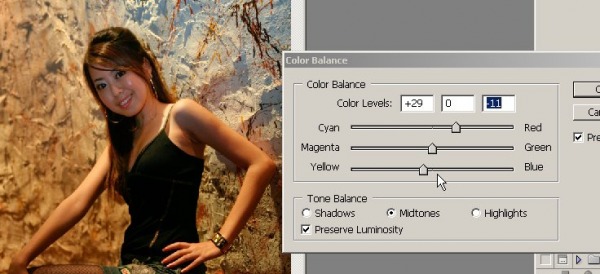
screen_15.jpg

Now just sit back and enjoy the finished product! I learnt a new thing today!
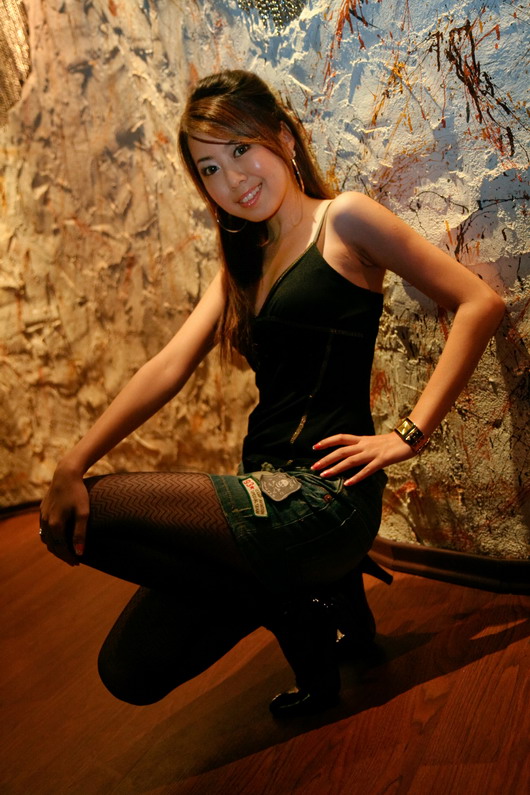
_mg_8955a.jpg

Note to self: There are still some things that can be improved though. The lower body is kinda underexposed. I can apply more layers to brighten up that area, but this will introduce more steps for my process flow. After all, I am a lazy fella!

Happy experimenting!

As promised, here are the steps to embed a YouTube movie into your Friendster blog. Note that all other websites that points you to embed from inside YouTube is just fucking wrong! If you still don’t know, allow me to share with you the details of it.

Let me first show you the wrong way to do it. If you have already tried to embed it and failed, you’ll know how frustrating this is.

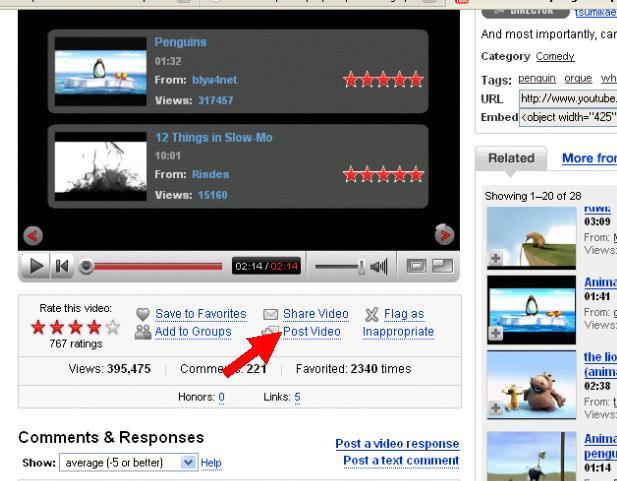
First, open you YouTube video and click on “Post Video”

step1.JPG

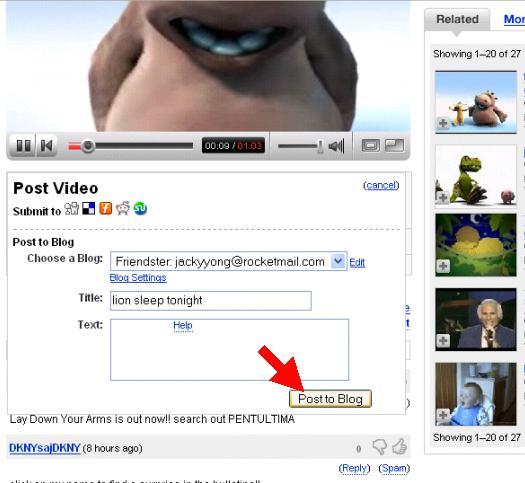
You’ll be shown your list of websites that you want to embed to. Choose Friendster, type some notes if you want to and click “Post to Blog”

step2.JPG

But when you open you Friendster blog, WTF??!! No videos? You have only succeeded in adding to your profile, NOT your blog. How stupid is that?

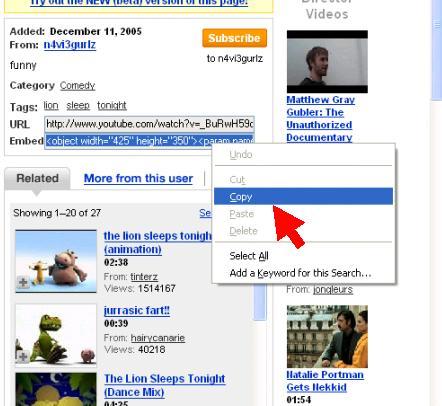
To overcome this problem, right click and copy from the “Embed” textbox instead:

step3.JPG

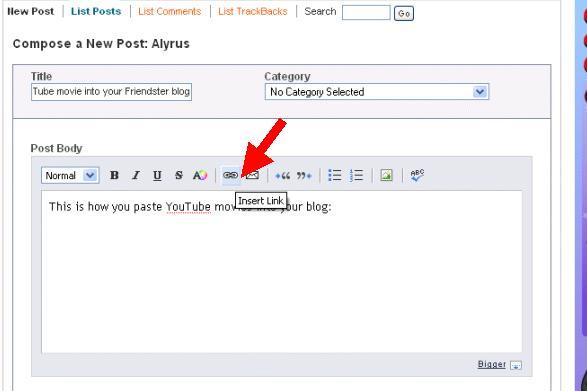
Then in your blog, click on the “Insert Link” button.step4.JPG

In the Enter URL page, DELETE ALL VALUES, leave it as blank! This is a very important step, else you will not be able to play your video properly later.

step5.JPG

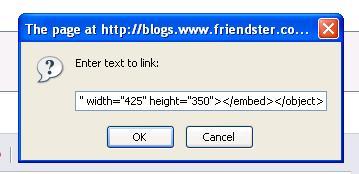
In the next step, “Enter Text to Link”, paste the bunch of text that you have copied earlier. Pressing Ctrl + V should do the trick.

step6.JPG

Hit OK, and there you’ll have it! You will not be able to see anything until you preview it. Try it out and see!

This tips was made possible with a little help from an old friend. Thanks a bunch! 😉

This blog won’t be complete without a proper YouTube video now, would it? So here is one of my favourite music videos. Enjoy!

My debut website!

Posted: 29th September 2007 by Jacky Yong in Computers, Silly me
Tags: , , ,

At long last, I splurged more than RM300 for a hosting and the rights to jackyyong.com! Please bear with me for a moment as I explore the complexity (or the lack of it) of webhosting, specifically using the Open Source scripts. In my site, I used Fantastico to deploy Drupal, hosted on Malaysia’s own Exabyte.com. I like their service so far. All my questions are answered within minutes!

Why Drupal? Well for one thing, Drupal is OPEN SOURCE!! (Did I tell you about my affinition towards Open Source?) There are lots of freely available plugins and themes. I’ll list down my modules and themes that I use at a later post. But for now, let me just announce my online presence!

P/S: I also need to migrate a lot of things over. For one thing, my previous blogs in http://alyrus.blogs.friendster and my photos in http://picasaweb.google.com/jackyyong have got to go. So expect to see a lot of post and pictures that you have seen before.

I am so ashamed of my own country lately. Those who have been noticing the advertisement on our local TV channel should have seen this awful song:

I mean, WHAT THE HECK IS THAT?? A song about how we should flush our toilet? Has it really come to this? This is the absolute worse patriotic song ever written for Malaysian prime time TV. (Dude, it’s played during the 8 pm prime time before the news!) Whatever happened to good old patriotic songs like Sudirman’s “Tanggal 31 Ogos” and “Perajurit Tanah Air” which were good songs, songs that I can still hum and sing to more than 20 years after I first heard them.

Another point of argument is the absolute junk that this song is, IF you can call it a song. Listen to it! The song is all in monotonous rant, one single note, totally mindless! Whoever wrote, sung, and approved this song to go on air must have the musical talent equivalent of a dung beetle.

Please Malaysia, wake up. You’re already 50 years old and you still eat crap for breakfast! Wake up dude!

Edit: This post has been edited to fix that layout problem with the embedded Youtube video, thanks to Ying Ying who helped me with that! Thanks a lot girl! Will write another post later on how exactly to fix that later.

I hate ducks!

Posted: 19th July 2007 by Jacky Yong in Silly me

I’ve never had a liking for their meat ever since I was a child. A recent family reunion fired up previous memories of this hatred, that I felt that I should share it out!

It was my brother who reminded me of this story. We stayed in Kampar since I was in Standard 1 or 2, I can’t remember. That was like 1985. Our paternal grandmother stays all the way in Mambang Diawan, about 45 minutes of bus journey, so she seldom sees us. My elder brother and I were her favourite grandsons. One fine day she came to visit us. She brought along food for us, and yes, you’ve guessed it: ROASTED DUCK THIGHS!! YUCK!!!

Thinking back, I really can’t blame her. In the olden days, ducks were a rarity, and they were considered luxurious food. But both my brother and I despised it! Granny handed over the ducks and we took it in our hands. I looked at my brother, and he looked at me. We had one look in our faces, and that’s gross! Since Granny was still around, we took a bite, just to “give face”. The meat was soooooo plasticky and hard, we couldn’t manage to even chew the damn bird properly. It seems like rubber to us.

Finally Granny moved away, she went to talk to our parents. Without hesitating we thought of a place to properly dispose of the duck. We couldn’t just put it in the kitchen, she’ll think we don’t like it. Ahh …. the rubbish chute! We opened the chute, chucked the unfinished meat, along with the half-chewed piece in our mouths, and away it flew!

When Granny finally came back, a few minutes later, she was quite surprised. “You two finished eating the duck already? That was fast!” My brother and I could only afford a stupid grin on our silly faces! =D

Flash, ISO and background exposure

Posted: 10th July 2007 by Jacky Yong in Photography

Flashing is undeniably one of the toughest variable to control in photography. Being a newbie handling a flash unit, I encounter a lot of obstacles and errors, resulting in very bad pictures, from a technical point of view.

If you remember one of my earlier posts, I did mention that dialing a high ISO in a flash filled picture will brighten up the background considerably. I might not have the samples to prove my point at that time, but now I have them. And I will be showing them to you here.
Read the rest of this entry »

Mines Fashion Xpression 2007

Posted: 19th June 2007 by Jacky Yong in Photography
Tags: ,

My first humble attempt at fashion photography happened last weekend in Mines Shopping. I had only my lousy kitlens and flash unit. Why do I complain that it’s lousy? Just read on…..

Before the show starts, as usual, some shots of the organizers and the MC. Do you guys know Lynn and Owen, host of 8TV’s “Hey Morning” every Saturday and Sunday mornings? Well, they were there, and I was very ignorant about it! When I entered the lift, I saw this tall handsome guy walking into the lift with me. I was all alone with him, and we didn’t acknowledge each other’s presence. No eye contact whatsoever.
Read the rest of this entry »

Show us your dry-box!

Posted: 18th June 2007 by Jacky Yong in Photography, Silly me

As a photographic enthusiast, I am sure that all of you handle your camera bodies and lenses carefully and ensure that they are well taken care of. I just want to where your baby sleeps tonight. In a fully electronic dry-cabinet, a dry box, or just your trusty ol’ camera bag?

To begin the thread, allow me to first post a picture of where my baby sleeps every night. As a very DIY guy (you’ve probably seen me do that DIY flash diffuser a couple of months back), I tend to look for the cheaper alternatives. I bought an air-tight box from Tesco.
Read the rest of this entry »